


確認したWindowsのバージョン
以下のWindows機で、確認しました。
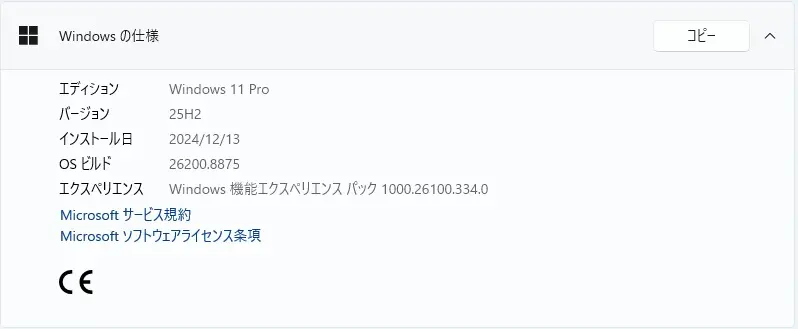
Windows 11 Version 25H2 PC です。
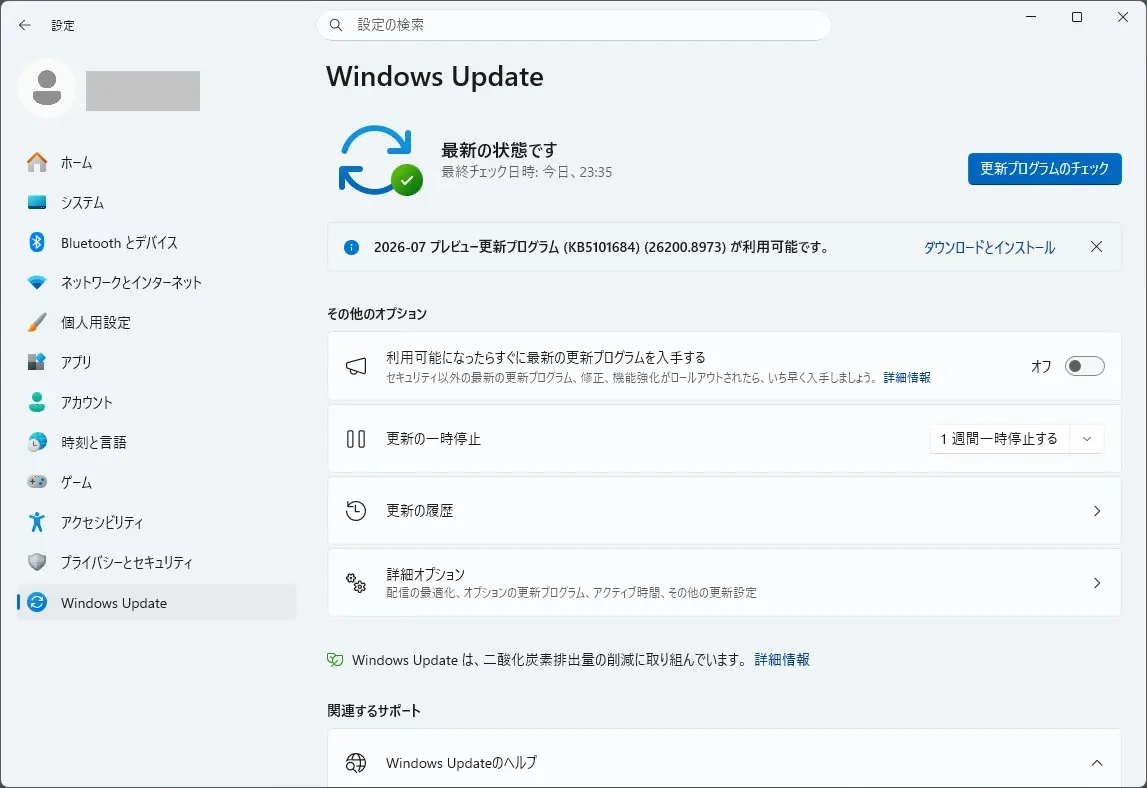
Windows Update に 2026-07 プレビュー更新プログラム (KB5101684)(26200.8973) が表示されました。
更新プログラムの内容
KB5101684 は、こちらから確認できます。

Highlights
This update is available through two release phases: gradual rollout and normal rollout. A gradual rollout delivers an update in phases, so features reach devices over time instead of all at once, meaning availability varies by device. A normal rollout is the broad release to all eligible devices at the same time, usually when it reaches general availability (GA).
The following summary outlines features from AI-powered Windows 11 PC experiences, along with improvements and fixes. The bold text within the brackets indicates the item or area of the change. Windows 11 PC experiences
This section highlights some new features and enhancements for Windows 11 PCs, including AI-powered capabilities, continuous innovation, and performance improvements.
File Explorer
- File sizes in the Details view now display using appropriate units (KB, MB, GB) instead of KB-only, making them easier to understand at a glance.
- Middle click to open a folder in a new tab is now supported in the Address Bar and the Home page for a more consistent and efficient tabbed navigation experience across File Explorer.
- This update eliminates a grey flash on load and unexpected scrolling to the top on the Home page in certain cases.
- This update improves the appearance of file thumbnails in the Recommended section on the Home page so they’re crisper and easier to read.
Windows Search
- This update improves app search to better handle typos and partial app names when finding installed apps.
- This update improves Settings relevance to surface more useful settings higher in search results.
Voice Access
- New! This update adds Voice Isolation to Voice Access, helping it better recognize your voice by reducing interference from other speakers and background noise. Voice Access now offers three speed recognition modes under Voice Access settings > Improve speech recognition:
- Voice Isolation — Filters out other speakers and background noise (one-time voice setup required).
- Remove background noise only — Filters out non-speech sounds like typing or door slams. No additional setup needed.
- No filtering — Default microphone input with no additional processing.
- To set up Voice Isolation, go to Voice Access settings > Improve speech recognition and select Voice Isolation.
- New! This update adds Korean language support for voice access.
- This update improves the realiability of starting Voice Access.
Widgets
- New! Taskbar notification badges now use your Windows accent color instead of appearing red, helping reduce unnecessary attention-grabbing alerts.
- New! This update also simplifies the Lock screen Widgets experience. For new users, Weather is now the only widget shown on the Lock screen by default.
Touchpad
- New! New gesture controls for precision touchpads are available in Settings > Bluetooth & devices > Touchpad:
- Scroll and zoom speed — Adjust the baseline speed for scroll and zoom gestures.
- Accelerated scrolling — Scroll faster the more you repeat the gesture, so you can move quickly through long documents.
- The update improves the reliability of Start menu view preferences, ensuring your selected view is retained.
- This update improves keyboard navigation when keyboard focus was set to the apps list within Start menu.
Voice Typing
- Fluid dictation is now off by default for new users. A teaching tip is also available when the feature is used for the first time.
Input
- This update improves persistence of mouse cursor size.
Windowing
- This update ensures system dialogs open at the appropriate size on small tablets.
Accessibility
- This update improves the Magnifier experience on touch-enabled devices. The horizontal and vertical touch bars used to pan the magnified view are now off by default, so they no longer obstruct magnified content. If you use touch to pan, you can turn the bars back on in Settings > Accessibility > Magnifier.
Windows Hello
- New! Windows Hello Enhanced Sign-in Security (ESS) now supports peripheral fingerprint sensors. This update extends this secure sign in option beyond devices with built in fingerprint sensors to include desktops and other Windows 11 PCs, including Copilot+ PCs. To get started, plug in a supported ESS fingerprint reader, go to Settings > Accounts > Sign in options, and follow the prompts to enroll. This feature was previously disclosed in January 2026 (KB5074105) and is now beginning to roll out.
Fonts
- This update restores support for Unicode variation sequences in the Myanmar Text font.
- This update improves character shaping and rendering for Mongolian Baiti font, providing more accurate and consistent text display.
Account Control
- This update refreshes the design of the Start menu account control and adds a badge that displays your subscription status. To view your account control, open the Start menu and select your account picture in the lower-left corner. This experience is available for users signed in with a Microsoft account. 1
Taskbar
- This update improves reliability of loading the system tray area of the taskbar when using the taskbar on touch devices in a tablet posture.
AI Component
- This update allows you to remove the Image Generation AI component from supported Copilot+ PCs where the component is installed.
Windows Setup
- This update adds a parental controls notice during Windows setup that highlights available family safety features.
Power and Battery
- This update improves the reliability of power settings by applying changes made in Settings to all power plans. This includes display, sleep, hibernate, power button, sleep button, and lid-close settings, helping ensure your preferences are consistently maintained.
- This update restores the ability to set a threshold for when energy saver should enable within Settings > System > Power & Battery.
Windows Update
- This update improves calculation of update progress progression in Windows Update Settings.
- This update includes changes to update clean-up logic to improve system performance immediately following an update.
Sounds
- This update improves system sounds when using Windows in dark mode.
Date and Time
- This update improves detection for triggering time zone change notifications.
- This update improves daylight saving time (DST) data accuracy for Middle East Standard Time (Beirut), Morocco Standard Time (Casablanca), Israel Standard Time (Jerusalem), and Greenland Standard Time (Nuuk).
Network
- This update improves the reliability of DHCP renewals in a few scenarios, particularly in the case of NACKs received from the DHCP server, as well as on devices that use Modern Standby.
- This update improves print time performance (page per minute) for IPPS (Internet Printing Protocol Secure) printers.
Clipboard
- This update improves clipboard reliability in some Remote Desktop and Azure Virtual Desktop (AVD) scenarios.
General Reliability
- This update improves explorer.exe reliability, including when opening Jump Lists and recent files, when sharing files and folders, and when using Task View and multiple desktops.
- This update improves the reliability of the Windows sign-in and lock screens, especially when system memory is low. It also improves the reliability of the Start menu and taskbar during startup.
1Feature availability varies by device and market.
Components updates
AI components
This release updates the following AI components to version 1.2607.840.0: Image Search, Content Extraction, Semantic Analysis, and Settings Model.
To learn more, see Release information for AI components.
Servicing stack update (SSU)
Includes KB5101711 (Build 26100.8962), which improves the reliability of the Windows update installation process. To learn more about SSUs, see Simplifying on-premises deployment of servicing stack updates.
The following summary outlines features from AI-powered Windows 11 PC experiences, along with improvements and fixes. The bold text within the brackets indicates the item or area of the change. Windows 11 PC experiences
This section highlights some new features and enhancements for Windows 11 PCs, including AI-powered capabilities, continuous innovation, and performance improvements.
File Explorer
- File sizes in the Details view now display using appropriate units (KB, MB, GB) instead of KB-only, making them easier to understand at a glance.
- Middle click to open a folder in a new tab is now supported in the Address Bar and the Home page for a more consistent and efficient tabbed navigation experience across File Explorer.
- This update eliminates a grey flash on load and unexpected scrolling to the top on the Home page in certain cases.
- This update improves the appearance of file thumbnails in the Recommended section on the Home page so they’re crisper and easier to read.
Windows Search
- This update improves app search to better handle typos and partial app names when finding installed apps.
- This update improves Settings relevance to surface more useful settings higher in search results.
Voice Access
- New! This update adds Voice Isolation to Voice Access, helping it better recognize your voice by reducing interference from other speakers and background noise. Voice Access now offers three speed recognition modes under Voice Access settings > Improve speech recognition:
- Voice Isolation — Filters out other speakers and background noise (one-time voice setup required).
- Remove background noise only — Filters out non-speech sounds like typing or door slams. No additional setup needed.
- No filtering — Default microphone input with no additional processing.
- To set up Voice Isolation, go to Voice Access settings > Improve speech recognition and select Voice Isolation.
- New! This update adds Korean language support for voice access.
- This update improves the realiability of starting Voice Access.
Widgets
- New! Taskbar notification badges now use your Windows accent color instead of appearing red, helping reduce unnecessary attention-grabbing alerts.
- New! This update also simplifies the Lock screen Widgets experience. For new users, Weather is now the only widget shown on the Lock screen by default.
Touchpad
- New! New gesture controls for precision touchpads are available in Settings > Bluetooth & devices > Touchpad:
- Scroll and zoom speed — Adjust the baseline speed for scroll and zoom gestures.
- Accelerated scrolling — Scroll faster the more you repeat the gesture, so you can move quickly through long documents.
- The update improves the reliability of Start menu view preferences, ensuring your selected view is retained.
- This update improves keyboard navigation when keyboard focus was set to the apps list within Start menu.
Voice Typing
- Fluid dictation is now off by default for new users. A teaching tip is also available when the feature is used for the first time.
Input
- This update improves persistence of mouse cursor size.
Windowing
- This update ensures system dialogs open at the appropriate size on small tablets.
Accessibility
- This update improves the Magnifier experience on touch-enabled devices. The horizontal and vertical touch bars used to pan the magnified view are now off by default, so they no longer obstruct magnified content. If you use touch to pan, you can turn the bars back on in Settings > Accessibility > Magnifier.
Windows Hello
- New! Windows Hello Enhanced Sign-in Security (ESS) now supports peripheral fingerprint sensors. This update extends this secure sign in option beyond devices with built in fingerprint sensors to include desktops and other Windows 11 PCs, including Copilot+ PCs. To get started, plug in a supported ESS fingerprint reader, go to Settings > Accounts > Sign in options, and follow the prompts to enroll. This feature was previously disclosed in January 2026 (KB5074105) and is now beginning to roll out.
Fonts
- This update restores support for Unicode variation sequences in the Myanmar Text font.
- This update improves character shaping and rendering for Mongolian Baiti font, providing more accurate and consistent text display.
Account Control
- This update refreshes the design of the Start menu account control and adds a badge that displays your subscription status. To view your account control, open the Start menu and select your account picture in the lower-left corner. This experience is available for users signed in with a Microsoft account. 1
Taskbar
- This update improves reliability of loading the system tray area of the taskbar when using the taskbar on touch devices in a tablet posture.
AI Component
- This update allows you to remove the Image Generation AI component from supported Copilot+ PCs where the component is installed.
Windows Setup
- This update adds a parental controls notice during Windows setup that highlights available family safety features.
Power and Battery
- This update improves the reliability of power settings by applying changes made in Settings to all power plans. This includes display, sleep, hibernate, power button, sleep button, and lid-close settings, helping ensure your preferences are consistently maintained.
- This update restores the ability to set a threshold for when energy saver should enable within Settings > System > Power & Battery.
Windows Update
- This update improves calculation of update progress progression in Windows Update Settings.
- This update includes changes to update clean-up logic to improve system performance immediately following an update.
Sounds
- This update improves system sounds when using Windows in dark mode.
Date and Time
- This update improves detection for triggering time zone change notifications.
- This update improves daylight saving time (DST) data accuracy for Middle East Standard Time (Beirut), Morocco Standard Time (Casablanca), Israel Standard Time (Jerusalem), and Greenland Standard Time (Nuuk).
Network
- This update improves the reliability of DHCP renewals in a few scenarios, particularly in the case of NACKs received from the DHCP server, as well as on devices that use Modern Standby.
- This update improves print time performance (page per minute) for IPPS (Internet Printing Protocol Secure) printers.
Clipboard
- This update improves clipboard reliability in some Remote Desktop and Azure Virtual Desktop (AVD) scenarios.
General Reliability
- This update improves explorer.exe reliability, including when opening Jump Lists and recent files, when sharing files and folders, and when using Task View and multiple desktops.
- This update improves the reliability of the Windows sign-in and lock screens, especially when system memory is low. It also improves the reliability of the Start menu and taskbar during startup.
1Feature availability varies by device and market.
※日本語ページが確認でき次第、差し替えます。
ハイライト
このアップデートは、段階的展開と通常展開の2段階で利用可能です。段階的な展開により、段階的にアップデートが行われるため、機能が一度にすべてではなく時間をかけてデバイスに届くため、利用可能範囲はデバイスによって異なります。通常の展開とは、通常、一般提供(GA)に達した時点で、すべての対象機器に同時に広範囲にリリースされることです。
以下の要約では、AI搭載のWindows 11 PC体験における機能と改善点、修正点を概説します。括弧内の太字は、変更の項目または領域を示します。 Windows 11 PCでの体験
このセクションでは、Windows 11 PCの新機能や強化、例えばAI搭載の機能、継続的なイノベーション、パフォーマンス向上を紹介します。
ファイルエクスプローラー
- 詳細ビューのファイルサイズはKBのみではなく、適切な単位(KB、MB、GB)で表示され、一目で理解しやすくなっています。
- アドレスバーやホームページで中クリックでフォルダを開く操作がサポートされ、ファイルエクスプローラー全体でより一貫性があり効率的なタブ付きナビゲーション体験ができるようになりました。
- このアップデートにより、ロード時のグレーフラッシュや、場合によってはホームページのトップに突然スクロールする現象がなくなります。
- このアップデートにより、ホームページのおすすめセクションのファイルサムネイルの見た目が改善され、より鮮明で読みやすくなりました。
Windows検索
- このアップデートでは、インストール済みアプリを見つける際の誤字や部分的なアプリ名の処理が改善されました。
- このアップデートでは、より有用な設定が検索結果の上位に表示されるように、設定の関連性が向上しました。
音声アクセス
- 新たに!このアップデートではVoice AccessにVoice Isolationが追加され、他のスピーカーや背景ノイズからの干渉を減らすことで、あなたの声をよりよく認識できるようになります。Voice Accessは現在、Voice Access設定で3つの速度認識モードを提供しています>音声認識を改善する:
- 音声隔離 — 他のスピーカーや背景雑音をフィルターします(一度きりの音声設定が必要です)。
- 背景音のみを除去する — タイピング音やドアのバタン音などの非音声をフィルターします。追加のセットアップは不要です。
- フィルタリングなし — 追加の処理なしのデフォルトのマイク入力。
- 音声隔離を設定するには、音声アクセス設定>音声認識を改善することから「音声隔離」を選択してください。
- 新たに!このアップデートでは、音声アクセスのための韓国語対応が追加されました。
- このアップデートにより、Voice Accessの開始の実現可能性が向上しました。
ウィジェット
- 新たに!タスクバーの通知バッジは赤色ではなくWindowsのアクセントカラーを使用し、不要な注意喚起を減らしています。
- 新たに!このアップデートはロック画面ウィジェットの体験も簡素化しました。新規ユーザー向けには、ロック画面にデフォルトで天気だけが表示されるウィジェットとなっています。
タッチパッド
- 新たに!精密タッチパッド用の新しいジェスチャーコントロールは、タッチパッド>Bluetoothおよびデバイス設定>で利用可能です。
- スクロールとズーム速度 — スクロールとズームジェスチャーのベースライン速度を調整してください。
- スクロール加速 — ジェスチャーを繰り返すほど速くスクロールし、長い文書を素早く進められます。
- このアップデートにより、スタートメニューの表示設定の信頼性が向上し、選択した表示が保持されることが保証されます。
- このアップデートでは、スタートメニュー内のアプリリストにキーボードフォーカスを設定していた場合のキーボード操作が改善されました。
ボイスタイピング
- 新規ユーザーにはデフォルトで音声入力がオフになっています。また、初めて使う際には指導のヒントも提供されます。
入力
- このアップデートにより、マウスカーソルサイズの持続性が向上しました。
ウィンドウイング
- このアップデートにより、小型タブレット上で適切なサイズでシステムダイアログが開かれることが保証されます。
アクセスのしやすさ
- このアップデートにより、タッチ対応デバイスでの拡大鏡の体験が向上しました。拡大ビューをパンするために使っていた水平および垂直のタッチバーはデフォルトでオフになっているため、拡大されたコンテンツの妨げにはなりません。タッチでパンを使えば、アクセシビリティ>拡大鏡>設定でバーを再びオンにできます。
Windows Hello
- 新たに!Windows Hello Enhanced Sign-in Security(ESS)は、周辺の指紋センサーもサポートしています。このアップデートでは、この安全なサインインオプションが内蔵指紋センサー搭載デバイスにとどまらず、デスクトップやCopilot+のPCを含む他のWindows 11 PCにも拡張されました。始めるには、対応するESS指紋リーダーを接続し、アカウント>設定>サインインオプションから、登録の指示に従って登録してください。この機能は2026年1月(KB5074105年)に公開されており、現在開始導入されています。
出典
- このアップデートにより、ミャンマーテキストフォントにおけるUnicodeバリエーションシーケンスのサポートが復活します。
- このアップデートでは、モンゴル語バイティフォントの文字形状とレンダリングが向上し、より正確で一貫したテキスト表示が可能になりました。
アカウント管理
- このアップデートでは、スタートメニューのアカウントコントロールのデザインが刷新され、購読状況を表示するバッジが追加されました。アカウントコントロールを見るには、スタートメニューを開き、左下のアカウント画像を選択してください。この体験はMicrosoftアカウントでサインインしたユーザーで利用可能です。1
タスクバー
- このアップデートにより、タブレットの姿勢でタッチデバイスでタスクバーを使用する際のシステムトレイエリアの読み込み信頼性が向上しました。
AIコンポーネント
- このアップデートにより、対応しているCopilot+のPCで画像生成AIコンポーネントを除去できます。
Windowsの設定
- このアップデートでは、Windowsの設定時に利用可能な家族向け安全機能を表示するペアレンタルコントロール通知が追加されました。
電源とバッテリー
- このアップデートでは、設定の変更をすべての電力プランに適用することで、電源設定の信頼性が向上します。表示、スリープ、休止、電源ボタン、スリープボタン、蓋を閉じる設定などが含まれ、設定が一貫して維持されるようサポートします。
- このアップデートでは、システム>バッテリー設定で省エネを有効にするべき閾値を設定できる機能>復活しました。
Windows アップデート
- このアップデートは、Windowsアップデート設定でのアップデート進行状況の計算を改善します。
- このアップデートには、アップデート直後にシステムのパフォーマンスを向上させるためのクリーンアップロジックの変更が含まれています。
音
- このアップデートにより、Windowsのダークモードで使用時のシステム音が改善されます。
日時
- このアップデートにより、タイムゾーン変更通知のトリガー検出が改善されました。
- このアップデートにより、中東標準時(ベイルート)、モロッコ標準時(カサブランカ)、イスラエル標準時(エルサレム)、グリーンランド標準時(ヌーク)のサマータイム(DST)データの精度が向上しました。
ネットワーク
- このアップデートにより、DHCPサーバーから受信されるNACKやModern Standbyを使用するデバイスにおいて、DHCP更新の信頼性がいくつかのシナリオで向上します。
印刷物
- このアップデートは、IPPS(インターネット印刷プロトコルセキュア)プリンターの印刷時間(ページ/分)性能を向上させます。
クリップボード
- このアップデートにより、一部のリモートデスクトップおよびAzure Virtual Desktop(AVD)シナリオでのクリップボードの信頼性が向上します。
一般的な信頼性
- このアップデートにより、ジャンプリストや最近のファイルを開く際、ファイルやフォルダの共有時、タスクビューや複数のデスクトップを利用する際など、explorer.exe信頼性が向上しています。
- このアップデートは、特にシステムメモリが少ない時にWindowsのサインインおよびロック画面の信頼性を向上させます。また、起動時のスタートメニューやタスクバーの信頼性も向上します。
1機能の利用可能範囲はデバイスや市場によって異なります。
コンポーネントのアップデート
AIコンポーネント
本リリースでは、以下のAIコンポーネントがバージョン1.2607.840.0に更新されました:画像検索、コンテンツ抽出、セマンティック分析、設定モデル。
詳細は「AIコンポーネントのリリース情報」をご覧ください。
サービススタックアップデート(SSU)
Windows アップデートのインストールプロセスの信頼性を向上させる KB5101711(ビルド 26100.8962)が含まれています。SSUについて詳しく知りたい方は、「サービススタック更新のオンプレミス展開の簡素化」をご覧ください。
このセキュリティ以外のアップデートには品質の向上が含まれています。以下の要約は、KBアップデートをインストールした後に解決された主要な問題を示しています。また、新機能も含まれています。括弧内の太字は、変更の項目または領域を示します。 セキュアブート
- このアップデートには、追加の高信頼度デバイスターゲティングデータが含まれ、新しいセキュアブート証明書を自動的に受け取る対象デバイスのカバー範囲が拡大されます。証明書の配布は、今後数か月にわたり、サポートされているPCや管理されていないビジネスデバイス間でWindowsアップデートを通じたもので継続されます。
アプリ
- このアップデートは、仮想化環境で使用されるOfficeアプリケーションの安定性を向上させます。ユーザーはOfficeアプリの操作や終了時に、より信頼性の高い体験を体験できるはずです。
ファイルエクスプローラー
- このアップデートは、DFSマッピングドライブに保存されたファイルが、ネットワークから切断された状態で起動し、その後再接続された際に誤ってインターネット発信者と認識される問題を解決します。これにより、ファイルエクスプローラーのプレビューペインに「プレビューしようとしているファイルがコンピュータに害を及ぼす可能性があります」というメッセージが表示されたり、DFSドライブからコピーされたファイルに予期せぬウェブマーク(Mark of the Web)が表示されたりすることがあります。
モバイルデバイス管理(MDM)
- このアップデートは、2026年7月14日以降にリリースされたWindowsバージョンを実行する新たにプロビジョニングまたは回復されたWindowsデバイスに影響を与える問題を解決するものです(KB5101650年)。Microsoft Intuneのようなモバイルデバイス管理(MDM)サービスに登録した後も、影響を受けたデバイスは誤った非準拠状態のまま企業リソースにアクセスできなくなる可能性があります。
保管
- このアップデートは、サーバーメッセージブロック(SMB)を使ったネットワーク共有へのファイル履歴自動バックアップに影響する問題を修正します。バックアップは機能せず、WindowsがSMB共有に接続時に偽の「無効な認証情報」エラーを表示しました。
以前のアップデートをインストールしている場合、デバイスはこのパッケージに含まれる新しいアップデートのみをダウンロード・インストールします。
コンポーネントのアップデート
AIコンポーネント
本リリースでは、以下のAIコンポーネントがバージョン1.2607.840.0に更新されました:画像検索、コンテンツ抽出、セマンティック分析、設定モデル。
詳細は「AIコンポーネントのリリース情報」をご覧ください。
サービススタックアップデート(SSU)
Windows アップデートのインストールプロセスの信頼性を向上させる KB5101711(ビルド 26100.8962)が含まれています。SSUについて詳しく知りたい方は、「サービススタック更新のオンプレミス展開の簡素化」をご覧ください。
となっています。この更新プログラムには既知の問題は見受けられていない模様です。
まとめ
2026年7月29日、 Windows Update に 2026-07 プレビュー更新プログラム (KB5101684)(26200.8973) が表示されました。
現在、特に不具合は見受けられませんので、様子見としました。
セキュリティ更新プログラム リリース スケジュール (2026年) は、こちらから確認できます。

次回のセキュリティ更新プログラム公開予定日は、日本標準時2026 年 8 月 12 日 (水)となっています。
Windows 11 Home and Pro において、
Version 24H2 は、2026年10月13日でサポート終了が予定されています。
Version 23H2 は、2025年11月11日でサポート終了となりました。
Version 22H2 は、2024年10月8日でサポート終了となりました。
Version 21H2 は、2023年10月10日でサポート終了となりました。

バージョン 開始日 終了日 Version 24H2 2024年10月1日 2026年10月13日 Version 23H2 2023年10月31日 2025年11月11日 Version 22H2 2022年9月20日 2024年10月8日 Version 21H2 2021年10月4日 2023年10月10日
Windows Update に、Version 25H2 が表示されましたので、25H2にしてみました。